QR Code Decoder: The Complete Guide to Decoding QR Codes Online
📖 Table of Contents
A QR code decoder is a tool that reads the data encoded in a QR code image and converts it back into human-readable text — usually a URL. Whether you're a casual user, a marketer verifying campaign QR codes, or a developer building an app, understanding how QR code decoders work will help you choose the right tool for the job.
What is a QR Code Decoder?
A QR code decoder (also called a QR code reader or QR code to URL scanner) is software that:
- Detects the QR code within an image (even if it's rotated, tilted, or partially obscured)
- Reads the pattern of black and white modules (squares)
- Decodes the binary data using Reed-Solomon error correction
- Outputs the resulting text, URL, or other data type
Modern decoders can handle various image formats (PNG, JPG, SVG, WebP, BMP, GIF), different QR code versions (1–40), and multiple error correction levels.
How QR Code Decoding Works (Technical Deep Dive)
Understanding the decoding process helps you troubleshoot when scans fail:
Step 1: Image Processing
The decoder converts the image to grayscale, applies thresholding to separate black from white modules, and corrects for perspective distortion.
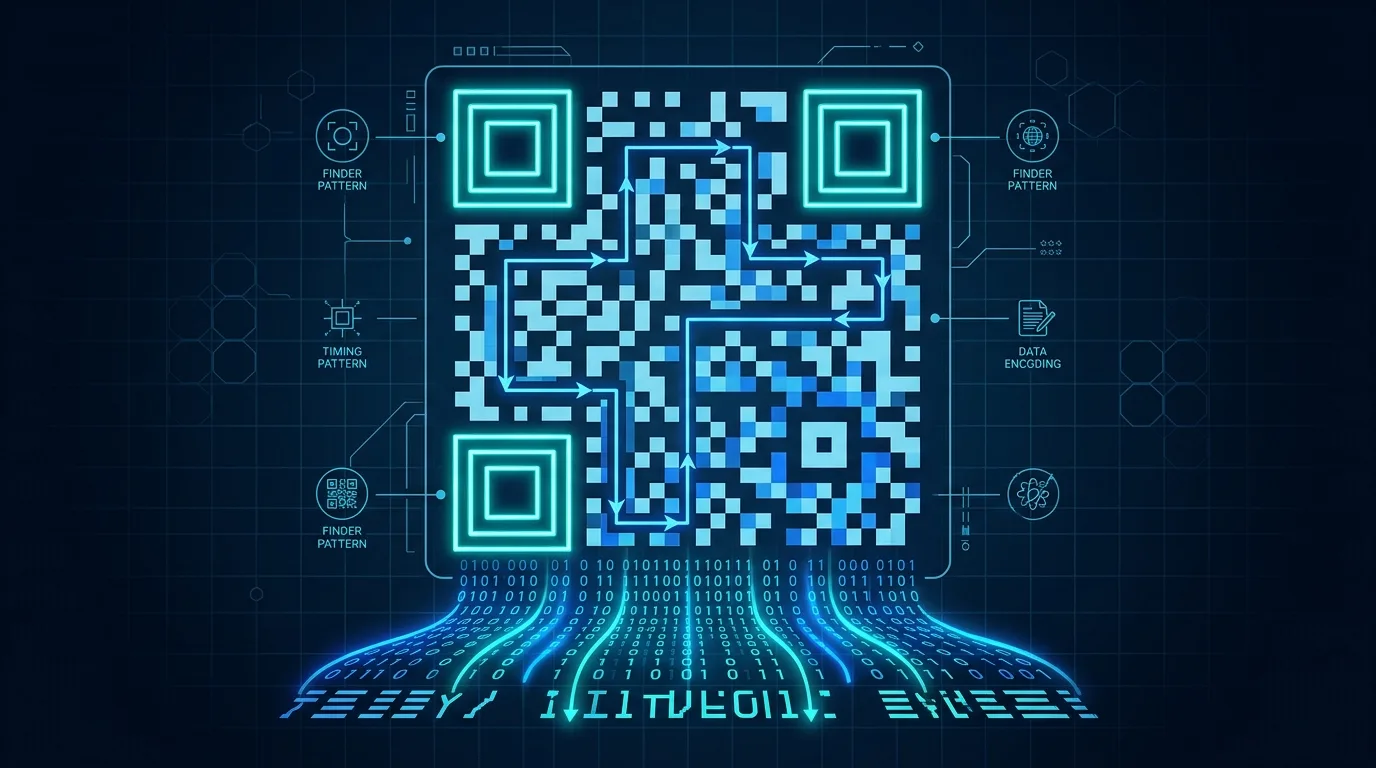
Step 2: Finder Pattern Detection
QR codes have three large squares in the corners (called finder patterns). The decoder locates these to determine the code's orientation, size, and boundaries.
Step 3: Grid Alignment
Using alignment patterns and timing patterns, the decoder creates a precise grid mapping each module (black/white square) to a binary value.
Step 4: Data Extraction
The binary data is read in a specific zigzag pattern, then decoded according to the encoding mode (numeric, alphanumeric, byte, or Kanji).
Step 5: Error Correction
QR codes use Reed-Solomon error correction, which can recover data even if up to 30% of the code is damaged or obscured. The four error correction levels are:
- L (Low): Recovers up to 7% damage
- M (Medium): Recovers up to 15% damage
- Q (Quartile): Recovers up to 25% damage
- H (High): Recovers up to 30% damage
Types of QR Code Content
QR codes can encode different types of data. A good decoder identifies the content type automatically:
- URLs: The most common type. Opens a website.
https://example.com - Plain text: Any text string, like a message or serial number.
- Email: Pre-filled email with recipient and subject.
mailto:[email protected] - Phone: Triggers a phone call.
tel:+1234567890 - SMS: Pre-filled text message.
smsto:+1234567890:Hello - Wi-Fi: Auto-connects to a Wi-Fi network.
WIFI:S:NetworkName;T:WPA;P:password;; - vCard: Contact card with name, phone, email, address.
- Calendar event: Adds an event to your calendar app.
- Geo location: Opens a map location.
geo:40.7128,-74.0060
Comparing QR Code Decoder Tools (2026)
Here's how popular QR code decoders stack up:
🏆 What to look for in a QR code decoder:
Speed (instant vs. seconds), accuracy (handles blurry/damaged codes), safety analysis (checks URLs for threats), batch processing (multiple codes at once), privacy (doesn't store your images), and API access (for developers).
imagesurl.com stands out by combining all these features: instant browser-side decoding, AI safety analysis, batch processing up to 50 images, zero image storage, and a developer API.
Batch Decoding: Process Hundreds of QR Codes
If you need to decode multiple QR codes at scale, batch processing is essential. Use cases include:
- Marketing teams: Verify that all QR codes in a campaign point to the correct URLs.
- Quality assurance: Check QR codes on product packaging before shipment.
- Research: Analyze QR codes collected from surveys, fieldwork, or web scraping.
- Security audits: Scan and verify QR codes across an organization's materials.
With imagesurl.com's batch scanner (Pro plan and above), you can upload up to 50 QR code images at once and get all decoded URLs in a downloadable CSV or JSON file.
QR Code Decoder API for Developers
Need to integrate QR code decoding into your application? imagesurl.com offers a simple REST API:
Example API Request:
POST https://api.imagesurl.com/qr-decode-url
Send a base64-encoded image and receive the decoded URL along with an optional AI safety analysis. The API supports:
- Single decode: One image per request, response in <500ms.
- Batch decode: Up to 50 images per request.
- AI analysis: Optional safety check on decoded URLs.
- Webhook notifications: Get notified when batch jobs complete.
💻 Developer-Friendly
API keys are available on the Pro plan and above. Integrate QR code scanning into your mobile app, web platform, or internal tool in minutes.
Pro Tips for Better QR Code Decoding
- Use high-resolution images: The clearer the image, the faster and more accurate the decode.
- Ensure good contrast: Black on white works best. Colored QR codes may fail with some decoders.
- Maintain the quiet zone: The white border around a QR code (quiet zone) is essential for detection. Don't crop it out.
- Avoid extreme angles: While decoders can correct for some perspective, straight-on captures are most reliable.
- Check the QR version: Larger QR codes (more modules) contain more data but need higher image resolution to decode accurately.
Decode Any QR Code in Seconds
Upload, paste, or capture — get the URL instantly with AI safety analysis. Free to start.
🔍 Start Decoding Free →Related Articles
- How to Extract a URL from a QR Code (5 Easy Methods)
The easiest methods to get a URL from any QR code image, step by step.
- Are QR Codes Safe? How to Detect Malicious QR Codes
Security guide: quishing attacks, red flags, and how AI protects you from dangerous links.